
If these tips aren't enough to get you started, help is just an e-mail away. Contact the webmaster, Chris McCormick, at cmccormick@mailsnare.net, or athenaeum@the-athenaeum.org.
Because we want to store so many materials, there is another reason for having person records. The Athenaeum is built on a database. We need ways to organize all of our data, and one such way is by person. For instance, you can look up paintings or poems by a single person. So you can also think of person records as a place to "attach" other records, such as records about artworks, writings, events, and so on. All of things things involve specific people, and in most cases it doesn't make sense to work on other records without having the person there first.
For the moment, our tools for entering people are very simple. All you need to start is the person's name. You should try to have the full name if possible, and make sure it is spelled correctly (remember, people will use the name to look up this person!). In addition, it may be a good idea to have the dates of birth (and death, if the person is deceased) for this person. And that's it - you're ready to go.
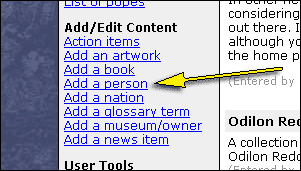
Many pages, including the main page of the site, have a navigation bar on the left side. One section of the navigation bar is called "Add/Edit Content". One of the links in that section is "Add a Person". Click the link to add a person.
There are a lot of fields on the page to add a person. You don't have to fill all of them out. They are divided into three main ideas - a person's name, their profession, and descriptive text. The name section takes up most of the form. Most of the fields are self-explanatory, but you may need more explanation for a couple of them.
- The display name is what name is displayed on most pages. For example, the English poet George Gordon is usually referred to as George Gordon, Lord Byron. Since our web scripts couldn't figure that out by themselves, we supply a place for you to enter it explicitly.
- The alternate or common name is slightly different. Some people have common names that we should be able to use in person searches, but which are probably not the best name to use for our "encyclopedia entry." For example, the early English king Alfred should probably be referred to as King Alfred, but many people may want to look him up by the common name "Alfred the Great."
- Lastly, the one name box allows you to specify that a person has only one name. In that case, you should put the single name in the first name box.
The descriptive text is a place for a short description or biography of the person. If you have a lot to add, you may want to wait until the person is entered. Then you can use our more powerful scripts to create an article, with multiple sections.
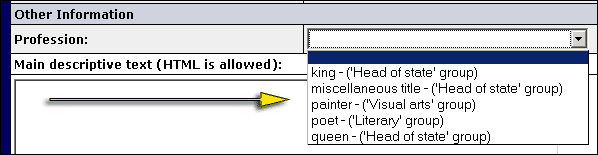
Lastly, there is the profession (see image below). Professions are very important to The Athenaeum - it's how we know whether to provide special tools. For instance, if you say that a person is an artist, a link will appear on that person's display page to add artworks. If you say that the person is a head of state, you will be asked to designate which country the person ruled, and when. This lets us provide special functions, without cluttering every page with irrelevant links. right now, the profession tools are very simple. Eventually you will be able to designate multiple professions, but for now, you can just select one from the list. You don't have to, but keep in mind:
- If you want to enter artworks for the person, you will need to select "painter" from the list.
- If you want to enter poems, you will need to select "poet" from the list.
- If you want to add the person to a country's list of rulers, you will need to select one of the ruling professions from the list.
Thanks for taking this short tutorial. As The Athenaeum evolves, we will add more capabilities. If you have ideas, let us know. We also want your feedback on the tutorials themselves. If there is any way this tutorial can be improved, please e-mail Chris at cmccormick@mailsnare.net.